TOUCH PANEL Command-HMI

Affordable  Full Color Touch HMI
More Than Just a Display
Unbranded Front Neutral Style
Get the features you actually need, without overpaying
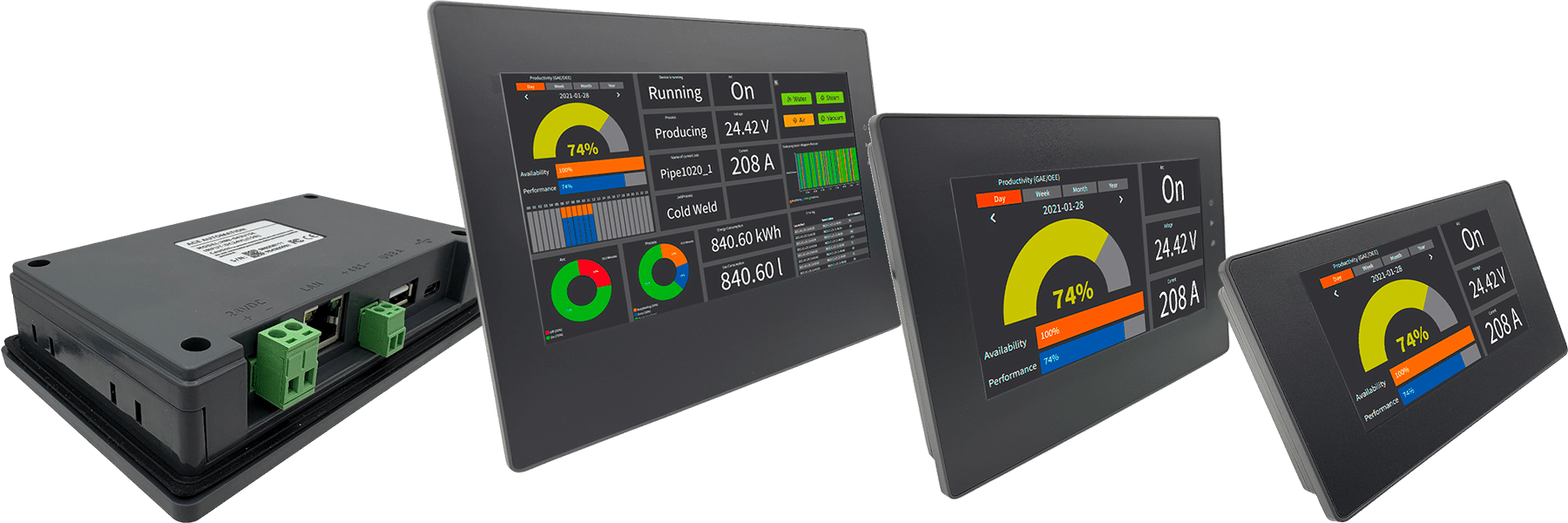
hmi ihm touche panel ecran tactil human machine interface industrial for plc sps

Key advantages

Excellent value without compromising reliability

Unbranded front panel, ready for your brand
Front IP65, fanless design for harsh environments
High brightness display for industrial visibility
Available sizes from 3.5 to 15.6 inches
powerful processor hmi touch panel

Efficient and modern hardware

ARM Cortex-A7 Dual Core processor, optimized for HMI performance
Fast screen response and stable operation
128 MB Flash and DDR memory for real applications

Built for industrial operation

Battery backed real time clock and retentive data
Low power consumption 12 to 24 VDC (24 VDC for 15.6″)
Operating temperature from -20 to +65°C

Fast deployment on site

Project download via Ethernet, USB-C, USB key
Export data, alarms, recipes and screenshots easily
Ethernet, WiFi, 4G, RS232/485, USB connectivity for extensions and peripherals

Free and capable software

Free programming software, no license cost
Simple yet powerful software with an extensive library of objects
Supports multilingual projects
Vector graphics and scalable UI
Macros, communication protocols, user management

REASONS TO USE Command-HMI

Free and capable software

” I am amazed at how easy it is to use the HMI software! “

commandhmi software for touch panel industrial

HMI tags in the vBuilder software for ACE PLCs

Large, Easy to use HMI Keypad

Extensive library of objects

IHM Toolbox — Function Graphics
🔘
Bit Switch
Bit Switch
Memory bit toggle button. Switches a register between 0 and 1 on touch action.
COIL
🔤
Word Switch
Word Switch
Writes a defined word value into a memory register when pressed.
REGISTER
📱
Screen Button
Screen Button
Navigation button between application HMI screens or pages.
NAV
💡
Bit Lamp
Bit Lamp
Binary status indicator. Changes appearance according to a memory bit value ON or OFF.
STATUS
🔆
MultiState Lamp
MultiState Lamp
Multi state indicator. Displays different appearances based on register value.
STATUS
🎛️
MultiState Switch
MultiState Switch
Cyclic multi state switch. Each press increments the associated register value.
CONTROL
🔢
Num. Display
Numeric Display
Displays the numeric value of a register in real time. Supports integers and decimals.
READ-ONLY
✏️
Num. Input
Numerical Input
Numeric input field. Opens a numeric keypad to write a value into a register.
READ/WRITE
Function Button
Function Button
Multi function button combining several actions into a single press.
MULTI-ACTION
📝
ASCII Display
ASCII Display
Displays an ASCII character string stored in consecutive registers.
STRING
⌨️
ASCII Entry
ASCII Entry
Alphanumeric input field. Stores text into memory registers.
STRING
🔲
Multi-fct Button
Multi-function Button
Advanced button combining status display and multiple configurable actions.
ADVANCED
🕐
Time Display
Time Display
Displays system time in real time using the selected format HH:MM:SS.
SYSTEM CLOCK
📅
Date Display
Date Display
Displays the current system date according to configured regional format.
SYSTEM CLOCK
📆
Week Display
Week Display
Displays the current day of the week.
SYSTEM CLOCK
🖼️
Static Picture
Static Picture
Fixed image embedded in the interface. Used to illustrate areas or equipment.
STATIC
🎨
Picture Display
Picture Display
Displays different images based on register value. State visualization using images.
DYNAMIC
📈
Trend Chart
Trend Chart
Real time trend chart. Plots the evolution of one or more variables over time.
REALTIME
📉
XYTrend Chart
XYTrend Chart
XY chart or scatter plot. Compares two quantities against each other.
XY PLOT
🗂️
Historic Trend
Historic Trend
Displays historically recorded data with time navigation.
HISTORY
📊
Datagroup Display
Datagroup Display
Displays a structured group of data in a configurable table format.
TABLE
🚨
Alarm Display
Alarm Display
Lists active alarms in real time with status and timestamp.
LIVE ALARM
🔔
History Alarm
History Alarm
Alarm history log. Review past events with date and time.
LOG
📢
Alarm Bar
Alarm Bar
Scrolling banner displaying active alarms continuously at the bottom of the screen.
TICKER
📋
Recipe Selector
Recipe Selector
Selects and loads a set of parameters from memory into registers.
RECIPE
📑
Recipe Data Display
Recipe Data Display
Displays the values of the active recipe in a readable table.
RECIPE
💾
Historical Data
Historical Data
Table for viewing data stored in internal memory or SD card.
ARCHIVE
📓
Operation Log
Operation Log
Log of operator actions including inputs screen changes and button presses with timestamps.
AUDIT
💬
Message Display
Message Display
Displays a predefined text message based on register value. Message library support.
TEXT
↔️
Graphics Move
Graphics Move
Moves a graphical object on screen based on register value on X or Y axis.
MOTION
🎭
Animation
Animation
Animates an object using sequential images based on register conditions.
SEQUENCE
🛤️
Path Display
Path Display
Animates an object along a predefined path. Simulates conveyors or carts.
CONVEYOR
Dynamic Circle
Dynamic Circle
Circle whose size color or position changes based on register value.
SHAPE
Dynamic Rectangle
Dynamic Rectangle
Dynamic rectangle whose dimensions or color change based on process data.
SHAPE
📐
Canvas/DXF
Canvas/DXF Display
Displays an imported DXF vector file. Integrates CAD diagrams into the HMI.
CAD IMPORT
〰️
Flowing Block
Flowing Block
Animated block simulating fluid or material flow in a given direction.
FLOW
🔗
Pipeline
Pipeline
Graphical representation of pipes with animated flow.
PIPE
↩️
Corner Flow Block
Corner Flow Block
Corner block for animated flows. Enables turns in piping circuits.
PIPE ELBOW
🥧
Pie Show
Pie Show
Pie chart displaying relative proportions of multiple values.
CHART
🌓
Arc Chart
Arc Chart
Arc gauge visualizing a percentage or value within a defined range.
GAUGE
📊
Bar Graph
Bar Graph
Vertical or horizontal bar chart for comparing multiple values.
CHART
⏱️
Meter
Meter
Analog gauge similar to voltmeter or ammeter. Needle position reflects register value.
ANALOG
🎚️
Dial
Dial
Rotary input control. Operator turns the knob to set a value.
INPUT
📋
ComboBox
ComboBox
Dropdown selection list. Each option corresponds to an integer value in a register.
DROPDOWN
📌
Message Board/G code
Message Board / G-code
Display table for messages or G-code programs for CNC machines.
CNC / TEXT
⬆️
Stepping Button
Stepping Button
Increment or decrement button with defined step. Gradually modifies a register value.
INCREMENT
🔵
Single Button
Single Button
Simple single action button. Triggers one predefined event.
BASIC
QR Code
QR Code
Generates a dynamic QR code from register data. Can be scanned from a mobile device.
2D BARCODE
Timer
Timer
Configurable timer. Counts up or down and triggers actions.
TIMER
⌨️
Keyboard
Keyboard
On screen virtual keyboard for alphanumeric input.
INPUT
🪟
Multi-window
Multi-window
Popup window or sub screen overlaid on the main screen. Multi layer navigation.
POPUP
↕️
ScrollBar
ScrollBar
Interactive scrollbar. Controls a register value by sliding.
SLIDER
🎛️
Slider
Slider
Sliding cursor for entering an analog value within a defined range.
ANALOG INPUT
🔀
Determinant List
Determinant List
Conditional list whose elements are determined by register conditions.
CONDITIONAL

CommandHMI 4.3″ + ACE PLC from 114 €

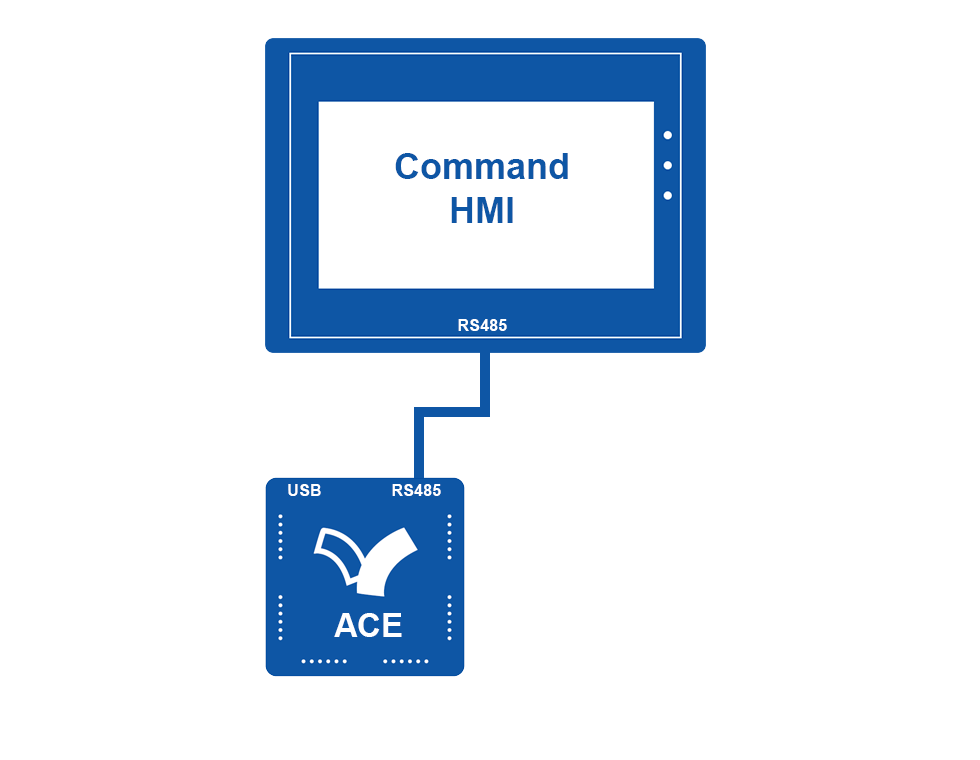
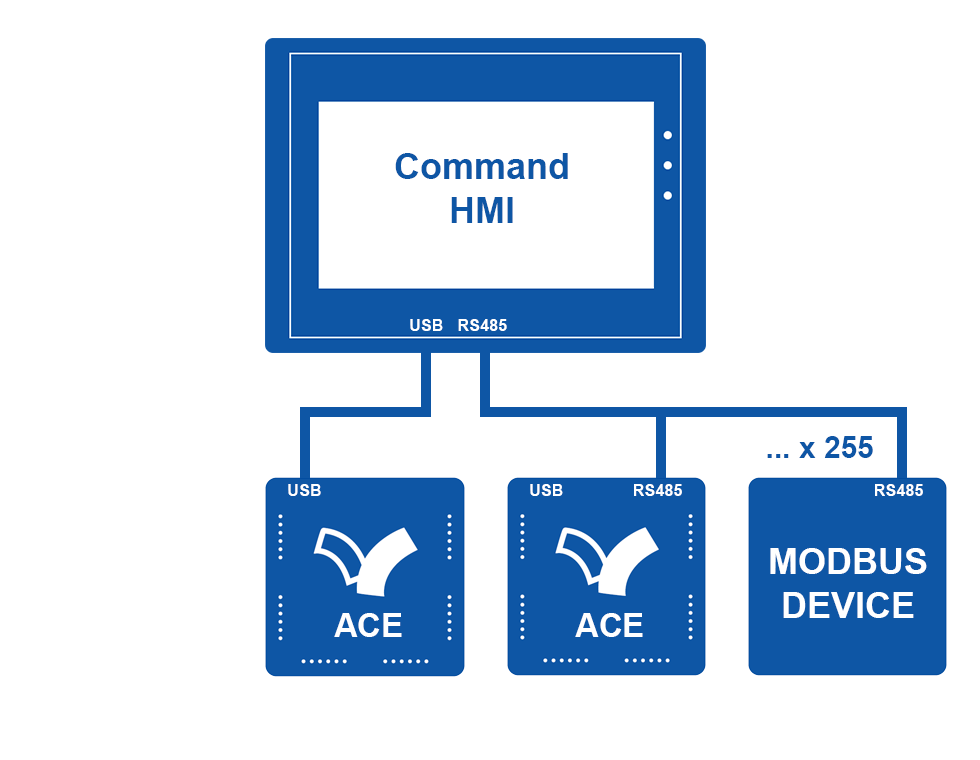
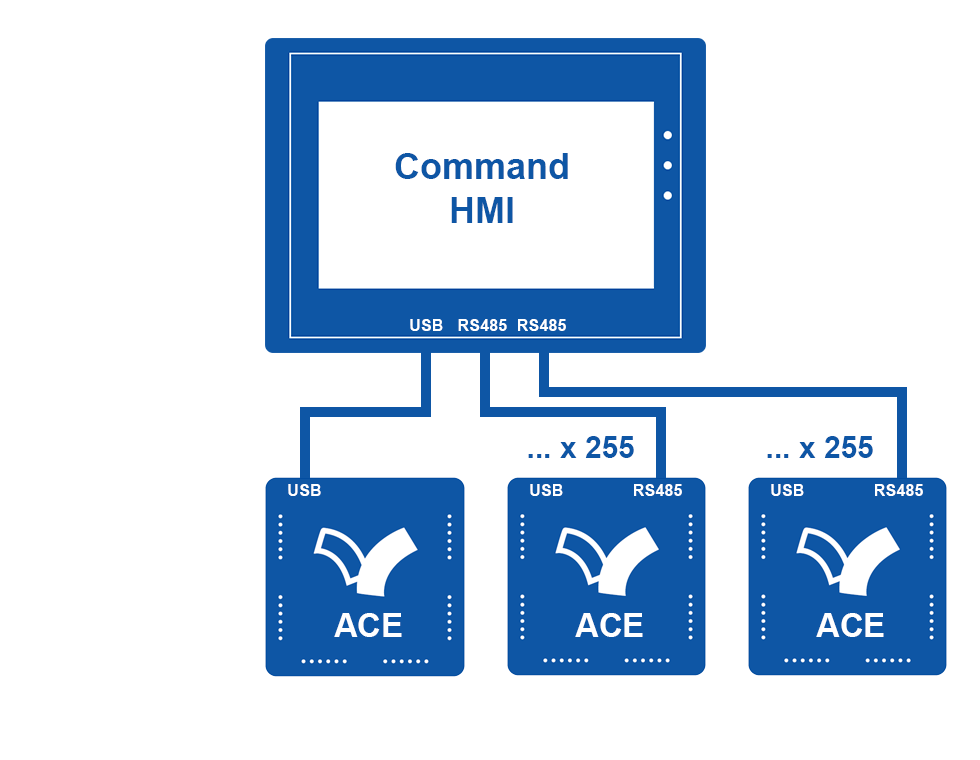
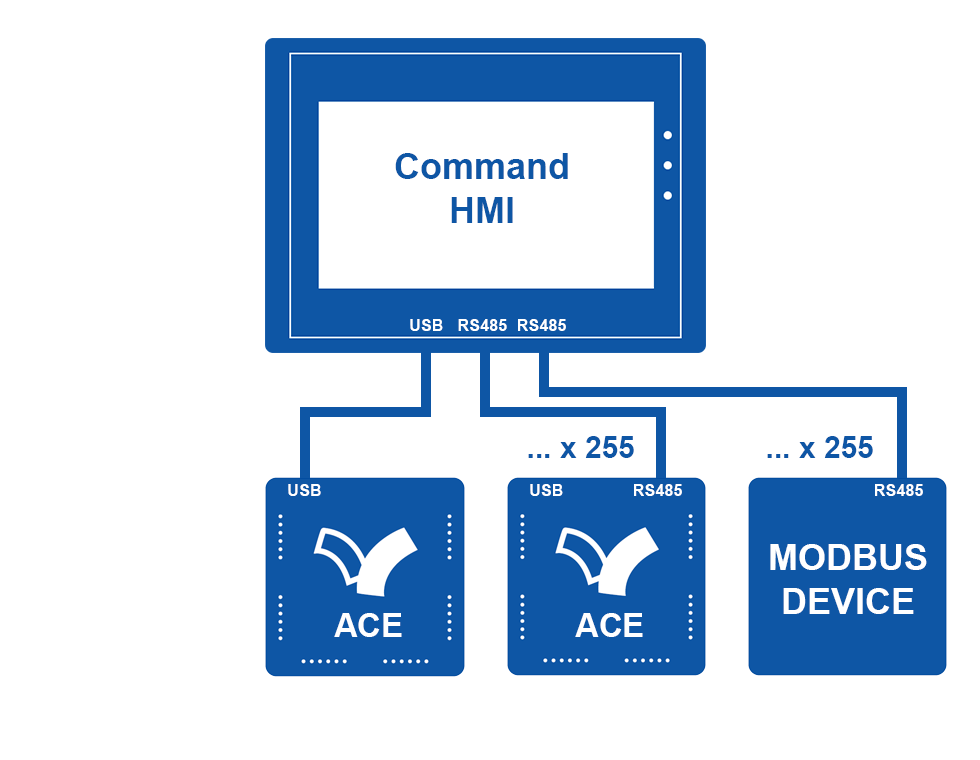
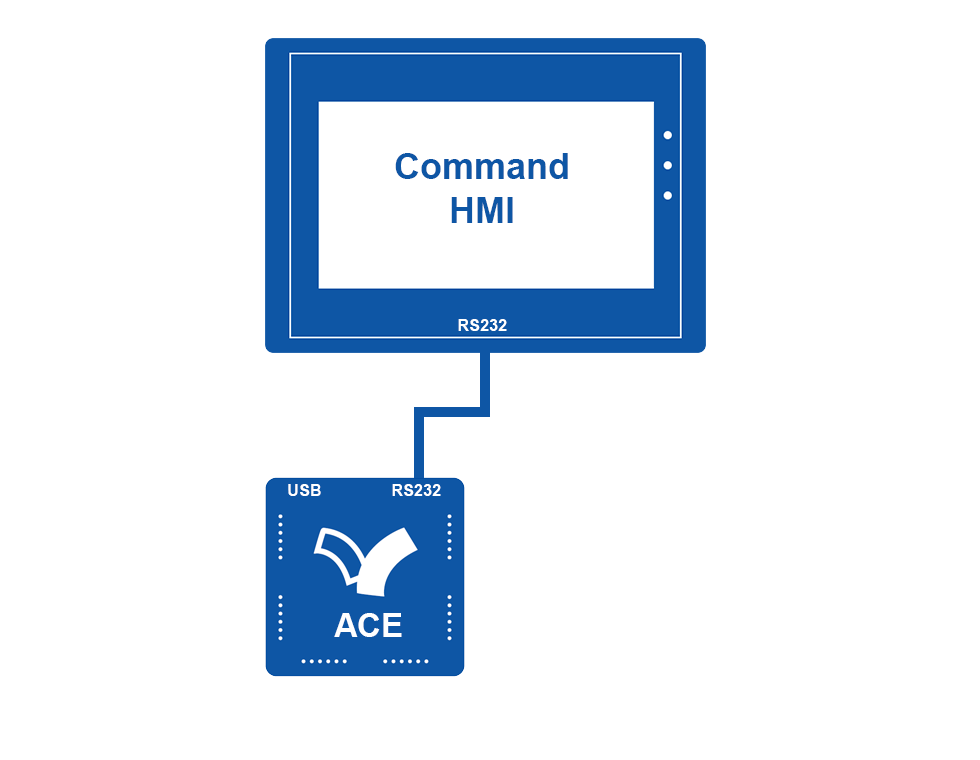
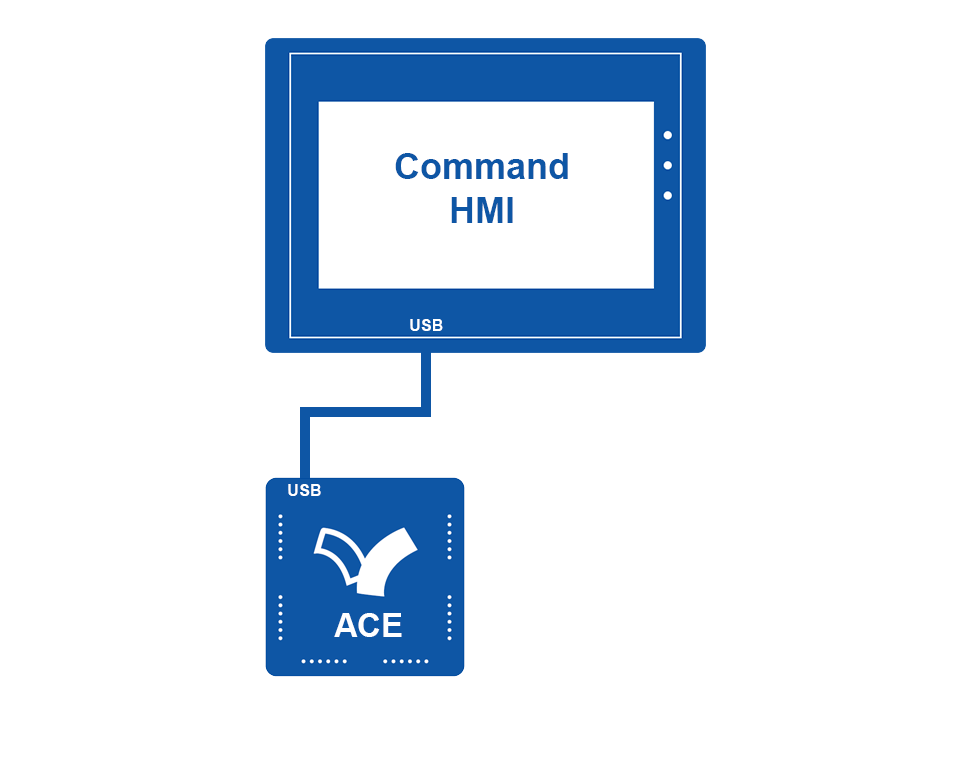
Fast integration with ACE PLCs via USB or RS232/RS485.
Compatible with other PLCs for maximum flexibility.

Note: vBuilder debug mode cannot run while using the PLC USB programming port.

Unbranded Front ✦ Neutral Style

Maybe you are an OEM machine builder.
Unmarked front panel. Logo-free start-up.
CommandHMI is deliberately designed to remain neutral, ensuring discreet and professional integration

Connect your CommandHMI to one or more ACE PLCs

All ACE PLCs feature a USB port.
Some models also include RS232 or RS485.
CommandHMI expands your possibilities.
See also…

Industrial Gateway

Ethernet WiFi 4G GPS MQTT
ACE Data under Remote Control

ACE PLC

The Incredible Nano PLCs
For Machine Builders
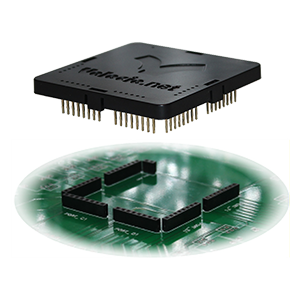
eACE PLC

To Embedded your ACE on a PCB
Adapted to your Needs

BUY ONLINE

Select your Solution
For your Machines

Subscribe to our newsletter

Nous n'avons pas pu confirmer votre inscription.
Votre inscription est confirmée.